为了方便管理多台CENTOS,需要做多台CENTOS之间的免账号密码登录。
首先在机器A(IP:192.168.1.105)上生成RSA公钥和私钥。
|
1 2 3 4 5 6 7 8 9 10 11 12 13 14 15 16 17 18 19 20 21 22 |
ssh-keygen Generating public/private rsa key pair. Enter file in which to save the key (/root/.ssh/id_rsa): Created directory '/root/.ssh'. Enter passphrase (empty for no passphrase): 回车 Enter same passphrase again: 回车 Your identification has been saved in /root/.ssh/id_rsa. Your public key has been saved in /root/.ssh/id_rsa.pub. The key fingerprint is: SHA256:PHfparPgfNATE8fuG+vDlpOn9YZuH7DGO97CxcTHAq4 root@vip5.92k.xin The key's randomart image is: +---[RSA 2048]----+ | . | | . + | | = ... | | . o o..oo| | S..=o.o..| | .oEo+ oo | | .. ooXoo | | o .+.@=*.o| | ooo=+X++o| +----[SHA256]-----+ |
生成好了之后,我们需要同步到其他CENTOS机器上面
|
1 2 3 4 5 6 7 8 9 10 11 12 13 14 |
ssh-copy-id root@192.168.1.101 /usr/bin/ssh-copy-id: INFO: Source of key(s) to be installed: "/root/.ssh/id_rsa.pub" The authenticity of host '192.168.1.101 (192.168.1.101)' can't be established. ECDSA key fingerprint is SHA256:Zjy1eMVh4Wm4ZbMv018a1DXMzcH7kYOFAQNnmT1ZJNo. ECDSA key fingerprint is MD5:98:46:fa:f9:2a:73:16:f0:12:5f:89:2a:d3:a9:93:c8. Are you sure you want to continue connecting (yes/no)? yes /usr/bin/ssh-copy-id: INFO: attempting to log in with the new key(s), to filter out any that are already installed /usr/bin/ssh-copy-id: INFO: 1 key(s) remain to be installed -- if you are prompted now it is to install the new keys root@192.168.1.101's password: (输入root的密码) Number of key(s) added: 1 Now try logging into the machine, with: "ssh 'root@192.168.1.101'" and check to make sure that only the key(s) you wanted were added. |
好了,我们就可以在192.168.1.105 免密码登录到192.168.1.101 机器上面了。

但是我们现在是无法直接从192.168.1.101直接免密码登录192.168.1.105的。
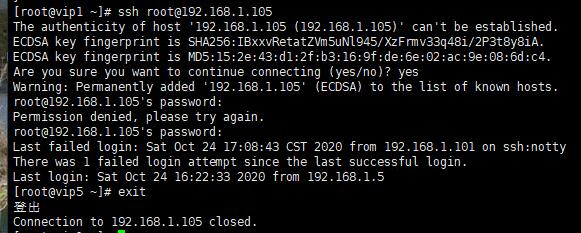
如果需要实现192.168.1.101免密码登录192.168.1.105,需要同样在192.168.1.101上做类似的同步操作。