Mysql8安装需要高版本的GCC,CentOS7下面的GCC版本为4.8.3,为了方便,我们用yum的SCL来升级GCC。
scl软件集(Software Collections),是为了给 RHEL/CentOS 用户提供一种以方便、安全地安装和使用应用程序和运行时环境的多个(而且可能是更新的)版本的方式,同时避免把系统搞乱。
|
1 |
yum install centos-release-scl scl-utils-build |
升级之后,我们来看下有哪些GCC可以使用的。
执行命令:
|
1 |
yum list all --enablerepo='centos-sclo-rh'|grep gcc |
显示如下:
|
1 2 3 4 5 6 7 8 9 10 11 12 13 14 15 16 17 18 19 20 21 22 23 24 25 26 27 28 29 30 31 32 33 34 35 36 37 38 39 |
libgcc.x86_64 4.8.5-39.el7 @anaconda compat-gcc-44.x86_64 4.4.7-8.el7 base compat-gcc-44-c++.x86_64 4.4.7-8.el7 base compat-gcc-44-gfortran.x86_64 4.4.7-8.el7 base devtoolset-7-gcc.x86_64 7.3.1-5.16.el7 centos-sclo-rh devtoolset-7-gcc-c++.x86_64 7.3.1-5.16.el7 centos-sclo-rh devtoolset-7-gcc-gdb-plugin.x86_64 7.3.1-5.16.el7 centos-sclo-rh devtoolset-7-gcc-gfortran.x86_64 7.3.1-5.16.el7 centos-sclo-rh devtoolset-7-gcc-plugin-devel.x86_64 7.3.1-5.16.el7 centos-sclo-rh devtoolset-7-libgccjit.x86_64 7.3.1-5.16.el7 centos-sclo-rh devtoolset-7-libgccjit-devel.x86_64 7.3.1-5.16.el7 centos-sclo-rh devtoolset-7-libgccjit-docs.x86_64 7.3.1-5.16.el7 centos-sclo-rh devtoolset-8-gcc.x86_64 8.3.1-3.2.el7 centos-sclo-rh devtoolset-8-gcc-c++.x86_64 8.3.1-3.2.el7 centos-sclo-rh devtoolset-8-gcc-gdb-plugin.x86_64 8.3.1-3.2.el7 centos-sclo-rh devtoolset-8-gcc-gfortran.x86_64 8.3.1-3.2.el7 centos-sclo-rh devtoolset-8-gcc-plugin-devel.x86_64 8.3.1-3.2.el7 centos-sclo-rh devtoolset-8-libgccjit.x86_64 8.3.1-3.2.el7 centos-sclo-rh devtoolset-8-libgccjit-devel.x86_64 8.3.1-3.2.el7 centos-sclo-rh devtoolset-8-libgccjit-docs.x86_64 8.3.1-3.2.el7 centos-sclo-rh devtoolset-9-gcc.x86_64 9.3.1-2.el7 centos-sclo-rh devtoolset-9-gcc-c++.x86_64 9.3.1-2.el7 centos-sclo-rh devtoolset-9-gcc-gdb-plugin.x86_64 9.3.1-2.el7 centos-sclo-rh devtoolset-9-gcc-gfortran.x86_64 9.3.1-2.el7 centos-sclo-rh devtoolset-9-gcc-plugin-devel.x86_64 9.3.1-2.el7 centos-sclo-rh devtoolset-9-libgccjit.x86_64 9.3.1-2.el7 centos-sclo-rh devtoolset-9-libgccjit-devel.x86_64 9.3.1-2.el7 centos-sclo-rh devtoolset-9-libgccjit-docs.x86_64 9.3.1-2.el7 centos-sclo-rh gcc.x86_64 4.8.5-39.el7 base gcc-c++.x86_64 4.8.5-39.el7 base gcc-gfortran.x86_64 4.8.5-39.el7 base gcc-gnat.x86_64 4.8.5-39.el7 base gcc-go.x86_64 4.8.5-39.el7 base gcc-objc.x86_64 4.8.5-39.el7 base gcc-objc++.x86_64 4.8.5-39.el7 base gcc-plugin-devel.x86_64 4.8.5-39.el7 base libgcc.i686 4.8.5-39.el7 base relaxngcc.noarch 1.12-6.el7 base relaxngcc-javadoc.noarch 1.12-6.el7 base |
我们安装一个高版本的GCC
|
1 |
yum -y install devtoolset-9-gcc.x86_64 devtoolset-9-gcc-c++.x86_64 devtoolset-9-gcc-gdb-plugin.x86_64 devtoolset-9-gcc-plugin-devel.x86_64 |
我们机器因为新装没有gcc命令,下面我们通过SCL启用GCC的高版本
scl enable devtoolset-9 bash
下面我们来看下GCC的版本
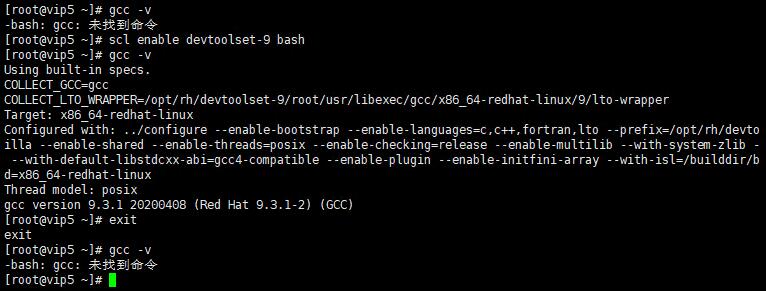
使用exit 退出当前scl版本的bash环境。我们暂时不退出,效果我们可以看一下上图。
下面我们进行MYSQL之前的操作:安装CMAKE,我们在GCC9的基础上面操作。
|
1 2 3 4 5 6 |
yum -y install wget openssl* wget https://github.com/Kitware/CMake/releases/download/v3.18.4/cmake-3.18.4.tar.gz tar -zxf cmake-3.18.4.tar.gz cd cmake-3.18.4 ./bootstrap gmake && make install |
下面我们进行MYSQL8的脚本编译安装
|
1 2 3 4 5 6 |
yum -y install git ncurses-devel wget https://downloads.mysql.com/archives/get/p/23/file/mysql-8.0.21.tar.gz tar -zxf mysql-8.0.21.tar.gz cd mysql-8.0.21 cmake -DWITH_BOOST=/tmp -DCMAKE_INSTALL_PREFIX=/web/mysql -DWITH_INNODB_MEMCACHED=ON -DDOWNLOAD_BOOST=1 -DFORCE_INSOURCE_BUILD=1 make -j8 && make install |
内存不够的朋友,可以将make -j8 8降低,不过编译时间会增加。反正我在编译中,出现了内存不足的情况,重新make的。
boost版本用的1.72.0版本,网络环境不好的童鞋,可以先下载到 /tmp/目录。
https://sourceforge.net/project/boost/boost/1.72.0/boost_1_72_0.tar.gz